


SNOW - AI Profile
SNOW Corporation
I approached SNOW - AI Profile as a photography app for people who want more than a basic camera shutter. It is made by SNOW Corporation and focuses on turning ordinary portraits and everyday moments into polished, playful images. After spending time with it, my view is fairly simple: it is most appealing when you enjoy experimenting with your appearance and sharing finished images quickly, but it is less convincing if you want a quiet, natural camera with minimal editing.
The app is free to install and is rated for Everyone, which makes it easy to try without committing money at the start. It has been available since November 3, 2015, and its long presence is reflected in its broad reach: it has passed 100 million installs. Its average rating is 3.7 from around 1.5 million ratings, with roughly 8,100 written reviews. Those figures suggest a huge audience, but also a mixed experience, so I would not treat popularity alone as proof that it will suit your style.
How I would decide whether SNOW is right for me
My first decision criterion would be the kind of photos I normally take. If my camera roll is full of selfies, group portraits, outfit checks, short social posts, and casual snapshots that need a little personality, this app makes sense. If I mainly photograph landscapes, food, documents, pets, or architecture, I would look first at a conventional camera or a more general photo editor.
The second question is how much control I want. SNOW is built around immediate visual changes rather than a slow editing session. That is useful when I want to see an effect while composing a shot, choose a look, and move on. It is not the same experience as taking a neutral image and carefully adjusting exposure, color, sharpness, and cropping afterward. The choice is really between speed and detailed control.
I also pay attention to whether an app encourages me to make a photo or merely gives me more buttons. Here, the appeal comes from trying different visual treatments until one fits the mood. That can make an ordinary moment feel more intentional. The trade-off is that the result may begin to look more like a designed social image than a faithful record of the person or place in front of the lens.
Latest News

Uber Eats Under Pressure: What Happens When Delivery Goes Wrong

How QR & Barcode Scanner Adapts to Android and iOS Innovations

Why Waze Navigation & Live Traffic Is Your Essential Travel Companion

CapCut Mastery: Unleash Hidden Features for Pro-Level Editing

How OS Updates Enhance Roblox Adventures

Teacher Simulator: Exam Time Turns Quick Classroom Judgments into a Repetitive Loop
One practical test I recommend is to use it for a full week without buying anything. Take the same kinds of pictures you normally take, then check whether you actually use the edited results. If the app helps you finish photos you would otherwise leave untouched, it is earning a place on your phone. If you only open it to browse effects and never save or share anything, the novelty may not last.
The first-use experience and everyday workflow
In everyday use, I found the strongest workflow begins before taking the picture. I decide whether the moment calls for a subtle enhancement, a more obvious transformation, or something deliberately playful. That small decision matters because an effect that looks fun in isolation can feel excessive once it is applied to a real conversation, a family photo, or a work-related profile image.
For a realistic example, imagine meeting friends after work. The light is uneven, nobody wants to stand still for several minutes, and you want one shareable group image before everyone leaves. A fast portrait-focused app is useful here because it keeps the process moving. I can try a look, check the composition, retake the image, and choose the version that feels most natural for the group. A desktop-style editor would offer more control, but it would be the wrong tool for that moment.
Gallery
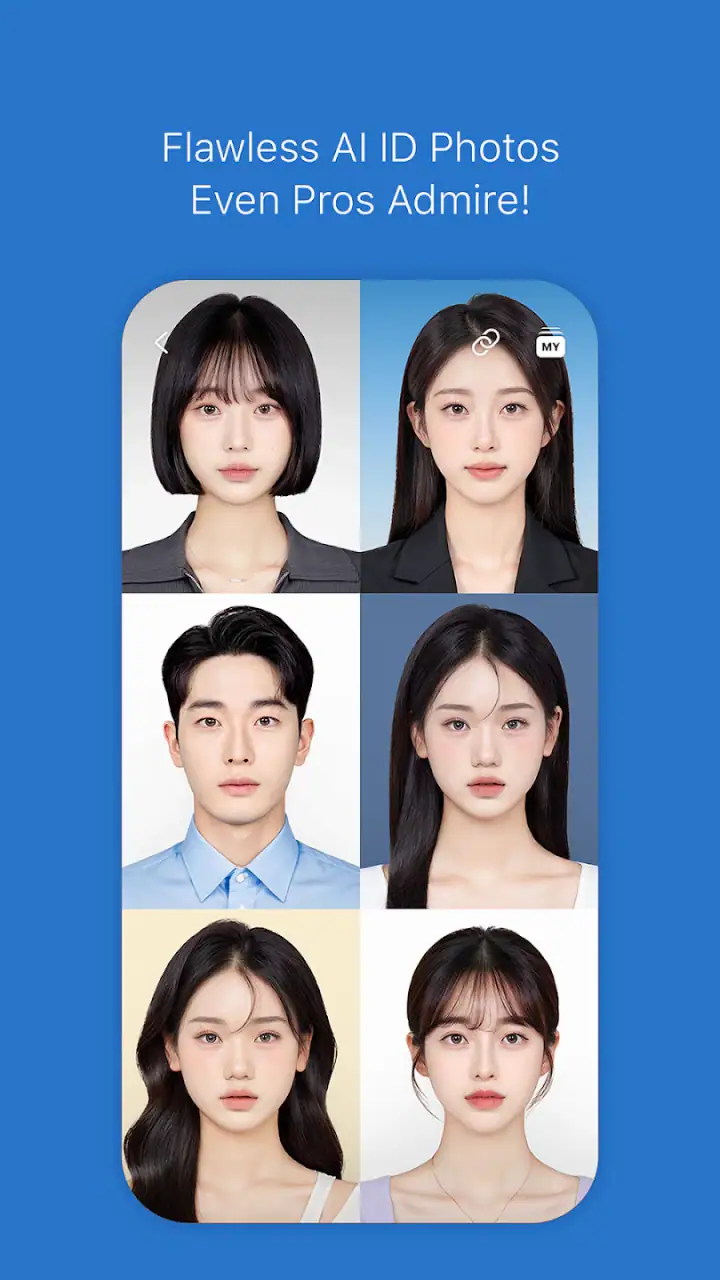
My advice is to separate capture from judgment. I take several versions rather than assuming the first preview is the best one. Small changes in distance, head position, and background can affect the final impression more than another round of effect browsing. This is one of the less obvious strengths of a live photography app: it encourages me to improve the original framing instead of trying to rescue every weak image afterward.
Another useful habit is to keep one unaltered version when the photo matters. A stylized portrait may be perfect for a social post, while the natural image may be better for a family archive or a professional use. Treating the edited version as the only version can create unnecessary regret later, especially when a particular look starts to feel dated.
Where the portrait-focused approach works best
The app’s biggest advantage is immediacy. I do not need to understand advanced photographic terminology to get a visible result. That makes it approachable for someone who wants a more finished-looking selfie but does not want to learn a full editing workflow. The visual feedback also makes experimentation less intimidating because I can decide in the moment whether a look suits me.
I think it is particularly useful for people who create casual profile images. A profile picture often needs to look clear, friendly, and intentional without appearing like a studio production. The key is restraint. I would try the effect, reduce the visual intensity if possible, and compare it with a plain version before choosing. The best profile image is usually the one that still resembles me when viewed at a small size.
It can also help with group photos where different people want different levels of styling. Rather than editing the image later on a separate device, I can make a quick decision while everyone is present. That saves time and avoids the awkward situation where one person receives a heavily edited result they never wanted.
Its real strength is lowering the distance between an idea and a finished portrait. I can move from “this could be a nice photo” to a usable result without building a project around it. That matters more than having an enormous toolbox when the moment is short-lived.
Small techniques that improve the results
I get better results when I treat the background as part of the effect. A busy background can compete with a stylized face, while a simple setting lets the subject remain readable. This is especially important for profile pictures, where the image may be displayed very small. I would rather use a modest look against a clean background than a dramatic treatment that disappears into visual clutter.
Lighting is another practical consideration. Even a strong portrait tool cannot completely solve harsh overhead light or a face hidden in deep shadow. I usually turn slightly toward a window or an open outdoor area, then compare the preview from that position. This takes only a moment and often improves the result more than switching repeatedly between similar looks.
I also recommend checking the edges of the frame. Portrait effects can draw attention to the face, so stray objects, cropped shoulders, or another person partly entering the image become more noticeable. Before saving, I look at the entire composition rather than concentrating only on the eyes or skin. That simple check prevents many images from feeling unfinished.
A less obvious use is creating a consistent set of casual images. For example, if I need several profile pictures over time, I can keep the framing, distance, and general visual mood similar. The result feels more coherent than choosing a completely different treatment every time. I would not force every photo into the same style, but a little consistency helps when the images are used across different social spaces.
Where it wins, and where another kind of app may fit better
Compared with the standard camera app on a phone, SNOW is more engaging for portraits because the creative decision happens during capture. A basic camera is usually better when I want dependable, neutral files and a simple interface. It is also the safer choice for documents, scenery, or situations where I do not want a visible style applied to the image.
Compared with a general photo editor, this app favors speed and approachability over deep correction. A general editor is a better fit when I need to fix a difficult exposure, remove distractions with precision, make careful color adjustments, or prepare an image for a specific print size. I would choose SNOW when the main task is making a portrait feel finished quickly, not when the image needs technical repair.
Compared with a dedicated professional camera workflow, the difference is even clearer. A professional-oriented tool is designed around control, repeatability, and preserving a flexible original. SNOW is designed around the immediate visual result. Neither approach is automatically superior; they solve different problems. I would not replace a serious camera workflow with it, but I would happily use it for spontaneous portraits between more deliberate shoots.
There is also a social difference between this app and a plain editor. SNOW feels oriented toward the moment of taking the image, while a conventional editor often begins after the photo already exists. That makes it more suitable for people who decide visually by trying options in real time. If I already know exactly how I want to edit a picture, a more controlled tool may get me there with fewer compromises.
The app may not be the right choice for someone who dislikes beautification, face-focused effects, or a playful visual style. It may also frustrate photographers who want every image to retain a natural appearance. In those cases, a neutral camera paired with a restrained editor is likely the better long-term setup.
What the free model means in practice
SNOW is free, so trying the basic experience does not require an upfront purchase. It includes in-app purchases ranging from $0.99 to $69.99 per item. I would pay attention to the purchase screen rather than assuming that every creative option belongs to the free experience. The broad range means the cost of optional items can vary considerably, and I would decide based on how often I use the app rather than buying because a single effect looks appealing.
My own rule would be to use the free version until I can name a repeated problem it solves. If I only want an occasional playful portrait, paying may not add enough value. If I use the app regularly for profile images or recurring social content and a paid option genuinely improves that workflow, the decision becomes easier. The important point is to judge the purchase by repeated use, not by the excitement of the first session.
There is a cost to switching away from a familiar workflow, even when the alternative is free. I would need to learn where the tools are, rebuild a preferred visual style, and possibly redo images that were captured with a different approach in mind. That is why I would not recommend changing apps simply because another one has a longer feature list. The better choice is the one that matches the photos I actually make.
On the other hand, switching away from SNOW may be worthwhile if I keep exporting images only to edit them again elsewhere. That extra step signals that the app is not covering my main need. In that situation, a more comprehensive editor could reduce friction, even if its first-use experience feels less entertaining.
Privacy, comfort, and choosing the right subject
Because this is a portrait-centered app, I would be thoughtful about whose image I am editing. With friends or family, I ask before applying a strong transformation or sharing the result. A funny effect can be harmless to one person and uncomfortable to another, especially when the image is posted publicly. The technical ease of making an edit should not replace ordinary courtesy.
I would also avoid using a stylized portrait for contexts that call for a straightforward representation. A playful image can work well for a casual social account, but a job application, an official form, or a professional introduction usually benefits from a natural and clearly recognizable photo. The app can help with framing and presentation, but it should not make the image misleading.
For younger users, the Everyone rating makes the app broadly accessible, but guidance still matters when photos are being shared. I would encourage anyone using it to review the final image before posting, check who can see it, and avoid treating every attractive result as something that needs to go online. The best use of the app can be private experimentation rather than constant publication.
How much the large audience should influence my choice
With over 100 million installs, SNOW is clearly not a niche experiment. Its 3.7 average from around 1.5 million ratings tells me that many people find value in it, while others encounter enough friction to rate it less enthusiastically. I read that as a reason to test it personally rather than as a warning or guarantee.
The number of written reviews is roughly 8,100, which is enough to show that user experiences are varied but not enough for me to assume every complaint applies to my phone or my habits. Photography apps can feel very different depending on the kind of device, lighting, portrait preferences, and willingness to use optional purchases. My own short trial is more useful than copying someone else’s conclusion.
I also would not confuse a large install base with universal suitability. An app can be popular because it serves one clear audience extremely well while remaining a poor match for another. In this case, that audience is people who enjoy quick, expressive portrait photography. If that description sounds like me, the popularity is encouraging. If it does not, the install count should not change my decision.
My recommendation after weighing the trade-offs
I recommend SNOW - AI Profile to anyone who wants a fast, approachable way to make portraits more expressive. It is a good first app for someone who finds traditional editing intimidating, and it is a useful companion for spontaneous group photos, profile-picture experiments, and casual social images. The free entry point makes it reasonable to test before deciding whether optional purchases are worthwhile.
I would skip it as my main photography tool if I care most about natural rendering, detailed manual control, or a carefully preserved original. In those situations, the usual phone camera or a more advanced editor is a better fit. I would also look elsewhere if I dislike trying several visual styles before settling on one, because experimentation is part of the app’s appeal rather than a side activity.
My practical recommendation is to begin with a simple portrait in good light, compare the result with the unedited version, and then try the same workflow in a group setting. Pay attention to whether the app saves time or merely adds choices. Keep natural copies of important images, use stronger effects selectively, and delay any in-app purchase until you know which part of the workflow you return to.
After that test, the decision should be clear. If I find myself opening it whenever I want a quick, polished portrait, it has earned a place on my phone. If I keep wishing for neutral images, technical corrections, or more precise editing, I would switch to a conventional camera and editor without hesitation. For me, SNOW succeeds not because it replaces every photography tool, but because it makes a specific kind of portrait creation immediate and enjoyable.
FAQs for SNOW - AI Profile
What is SNOW - AI Profile, and how does it work?
SNOW - AI Profile is an innovative app that uses advanced AI technology to create personalized digital profiles and avatars. Users can upload their photos, and the app generates unique, stylized images and avatars. It offers a variety of customization options, allowing users to explore different artistic styles and themes.
Is SNOW - AI Profile available for both Android and iOS devices?
Yes, SNOW - AI Profile is available for both Android and iOS platforms. Users can download the app from the Google Play Store for Android devices or the App Store for iOS devices, ensuring compatibility with a wide range of smartphones and tablets.
Does SNOW - AI Profile require an internet connection to function?
While some features of SNOW - AI Profile can be used offline, an internet connection is required for accessing AI-driven features and updates. The app processes images using cloud-based AI technology, which necessitates internet connectivity for optimal performance and new content access.
Are there any in-app purchases or subscriptions in SNOW - AI Profile?
SNOW - AI Profile offers both free and premium features. While the core functionalities are available for free, users can opt for in-app purchases or subscriptions to unlock additional features, styles, and content packs. This model allows users to enhance their experience as needed.
How does SNOW - AI Profile ensure user privacy and data security?
SNOW - AI Profile prioritizes user privacy and data security. The app employs encryption and secure servers for data processing. User photos are not stored permanently, and personal data is handled according to strict privacy policies. Users can review these policies within the app settings.
Pros
- Intuitive interface for easy navigation.
- Wide range of AI-generated filters.
- High-quality photo edits instantly.
- Regular updates with new features.
- Customizable avatar options.
Cons
- Requires a stable internet connection.
- Some features locked behind a paywall.
- Can be resource-intensive on devices.
- Occasional ads in the free version.
- Limited support for older devices.


